🔥 Curated Daily Deals & Finds

Discover Today's
Coolest Finds

Hand-picked deals, trending gadgets, and must-have products — updated daily so you never miss a great find on the things you actually want.

🏆 #1 Pick
INSMY C12 Bluetooth Speaker

INSMY C12 Bluetooth Speaker

★★★★★ (12,400 reviews)
$25 $35 29% OFF
View Deal →
🔥 Trending #1 This Week
Deals and FindsDeals & Finds Tech and GadgetsTech & Gadgets Home and KitchenHome & Kitchen Fashion and StyleFashion & Style OutdoorsOutdoors All FindsAll Finds

TP-Link Archer BE900 Review: WiFi 7 for the Whole House
Written By
Cool Finds Daily
Cool Finds Daily Editorial Team

Expert Reviewed
Cool Finds Daily Review Process
Independently tested & fact-checked

Updated
April 29, 2026
9.2
Expert Score
Performance

9.5

Coverage

9.4

Features

9.6

Ease of Use

9.0

Value

8.2

TP-Link Archer BE900
$599.99
Check Price on Amazon

Key Features

📡

Quad-Band WiFi 7

Four wireless bands (2.4 GHz + dual 5 GHz + 6 GHz) so dozens of devices each get their own lane. No more bandwidth fights between your TV and your Zoom call.

Dual 10G Ports

One SFP+ and one RJ45, both 10 Gbps. Future-proof for when your ISP catches up, and local NAS transfers are night-and-day faster right now.

💻

Built-In Touchscreen

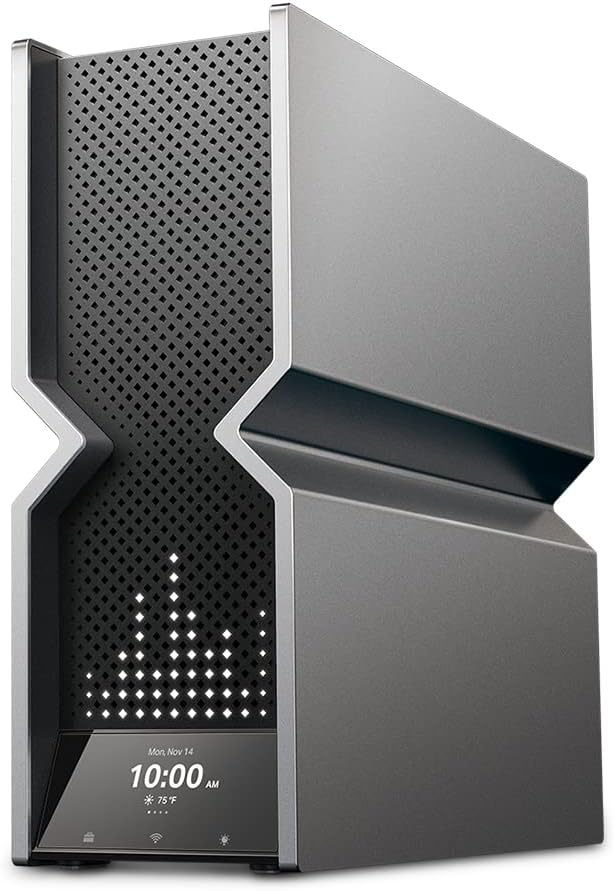
2.4-inch LED display shows connected devices, network speed, and firmware status. Quick status check without opening the app.

🛡

HomeShield Security

Free basic tier includes parental controls, QoS, and threat protection. Paid tier adds IoT device scanning and detailed reports.

Our Experience

WiFi 7 routers are finally hitting the market, and TP-Link’s Archer BE900 goes all-in on the new standard. I ran it for a few weeks in a 2,400 sq ft house with about 40 connected devices, and the difference from my old WiFi 6 setup was immediate.

On the 6 GHz band with a WiFi 7 laptop, I was pulling around 2.1 Gbps at close range. Through two walls at the far end of the house, that dropped to about 650 Mbps, still way more than most connections need. The 5 GHz bands held steady around 800 Mbps nearby, 300 Mbps at range. No dead spots anywhere, including the garage.

Most WiFi 7 routers ship with tri-band. The BE900 adds a fourth band, that extra 5 GHz radio is a big deal if your house is full of devices fighting for bandwidth. Streaming on the TV, video calls in the office, gaming in the basement, each gets its own lane.

I expected the touchscreen to be a gimmick. It’s not. Quick glance at connected devices, network speed, firmware updates, no app needed. You can even set it to show the time or weather. Small thing, but it makes the router feel less like a forgotten box on a shelf.

TP-Link’s Tether app walks you through setup in about 5 minutes. Nothing complicated. The whole process took less time than unboxing it.

Pros & Cons

What We Liked

  • Quad-band keeps tons of devices from competing for bandwidth
  • Dual 10G ports are future-proof for years
  • Touchscreen gives quick status without opening the app
  • Rock-solid coverage across a 2,400 sq ft home, no dead spots
  • Setup takes about 5 minutes through the Tether app

Worth Knowing

  • Premium price at ~$600, not for casual users
  • Large footprint takes up real shelf space
  • WiFi 7 client devices are still limited right now

Full Specifications

WiFi Standard WiFi 7 (802.11be)
Bands Quad-band (2.4 GHz + 2x 5 GHz + 6 GHz)
Max Combined Speed 24 Gbps
Ethernet Ports 1x 10G SFP+, 1x 10G RJ45, 4x 2.5G, 1x 1G
Display 2.4-inch LED touchscreen
USB 2x USB 3.0
Coverage Up to 3,000+ sq ft
Security HomeShield (basic free, premium subscription)
Processor 1.6 GHz quad-core
RAM 2 GB

Frequently Asked Questions

Is WiFi 7 worth upgrading to in 2026?
If you’ve got 20+ devices at home and work remotely on video calls, yes. The extra bandwidth and multi-device handling are a noticeable step up from WiFi 6. If you’ve got a small apartment with 5 devices, you can wait.

Does the BE900 work with older WiFi 5 and WiFi 6 devices?
Fully backward compatible. All your existing devices connect and work fine, they just won’t hit WiFi 7 speeds (they’ll run at their own max speeds).

Do I need a 10G internet plan to use the 10G ports?
No. The 10G ports are great for local file transfers (NAS to PC, for example) right now. When 10G internet becomes common, you won’t need a new router.

How big of a house can this cover?
TP-Link rates it for 3,000+ sq ft. I tested it across 2,400 sq ft with no dead spots. For larger homes, you can add TP-Link mesh units.

The Bottom Line

9.2 / 10

The TP-Link Archer BE900 is the WiFi 7 router to beat in 2026. Quad-band support, dual 10G ports, a touchscreen that’s actually useful, and coverage that blankets a large home without dead spots. It’s overkill for a one-bedroom apartment, but for a mid-to-large home full of devices? This is the one. The price sits in premium territory, but you’re getting hardware that won’t need replacing for years.

Check Price on Amazon

As an Amazon Associate, we earn from qualifying purchases.

You might also like:

Browse all Home & Kitchen →

script> script> noscript>
Cool Finds Daily
Logo
Compare items
  • Total (0)
Compare
0