Mobile Pixels Duex Max Review: A 14-Inch Portable Monitor for Your Laptop
Key Features
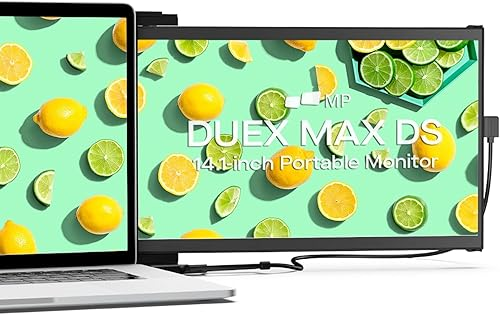
14.1″ FHD IPS Display
Full 1080p resolution at 60Hz. Colors look accurate and viewing angles are wide enough that you dont need to be sitting dead center. Good for spreadsheets, code, or chat windows.
Magnetic Slide Mount
Attaches to the back of your laptop lid with adhesive magnets and slides out to the side when needed. Folds flat when youre done. No separate stand or cable clutter.
USB-C and HDMI
Works with USB-C display out or HDMI. Compatible with basically any laptop made in the last 5 years. Plug and play on Mac and Windows.
Travels With Your Laptop
Stays attached to your laptop lid so you dont carry a separate bag or case. Total weight is about 1.4 lbs added to your setup.
Pros & Cons
What We Liked
- Stays attached to laptop, no separate carry case needed
- USB-C single cable connection, true plug and play
- Good display quality for productivity at 1080p/60Hz
- Magnetic mount is secure after proper initial setup
Worth Knowing
- Adds 1.4 lbs to your laptop lid, affects hinge balance on light laptops
- $250 is steep for a 1080p portable panel
- Initial magnet alignment requires patience to get right
Quick Specs at a Glance
| Brand | Mobile Pixels |
| Model | Duex Max DS |
| Price | $249.99 |
| Screen Size | 14.1 inches |
| Resolution | 1920 x 1080 (FHD) |
| Refresh Rate | 60Hz |
| Connectivity | USB-C, HDMI |
| Weight | 1.4 lbs |
| Compatibility | macOS, Windows, Chrome OS |
Frequently Asked Questions
Will this work with my MacBook Air?
Can I use it as a standalone monitor on a desk?
Does the adhesive damage my laptop?
Final Verdict
The Mobile Pixels Duex Max DS solves a specific problem really well: getting dual monitors when you’re away from your desk without carrying a separate screen in a bag. The magnetic slide-out design is clever, the display is sharp enough for real work, and USB-C plug-and-play means zero driver hassle. At $250 and 1.4 lbs of added weight, its not for everyone. But if you’re a remote worker or digital nomad who genuinely needs two screens on the go, this is the cleanest solution we’ve found. The Trio 3 Pro gives you three screens if you need more, but for most people the single extra display is the sweet spot.
Check Price on AmazonYou might also like:
- Best Gadgets for Dog Owners in 2026: 5 That Earn Their Keep
- 5 Cooling Gadgets That Actually Work for Summer 2026
- Amazfit Up Open-Ear Earbuds Review: Workout Audio That Leaves Your Ears Open