Is the Mobile Pixels Triple Monitor Setup Worth It? 2026 Review
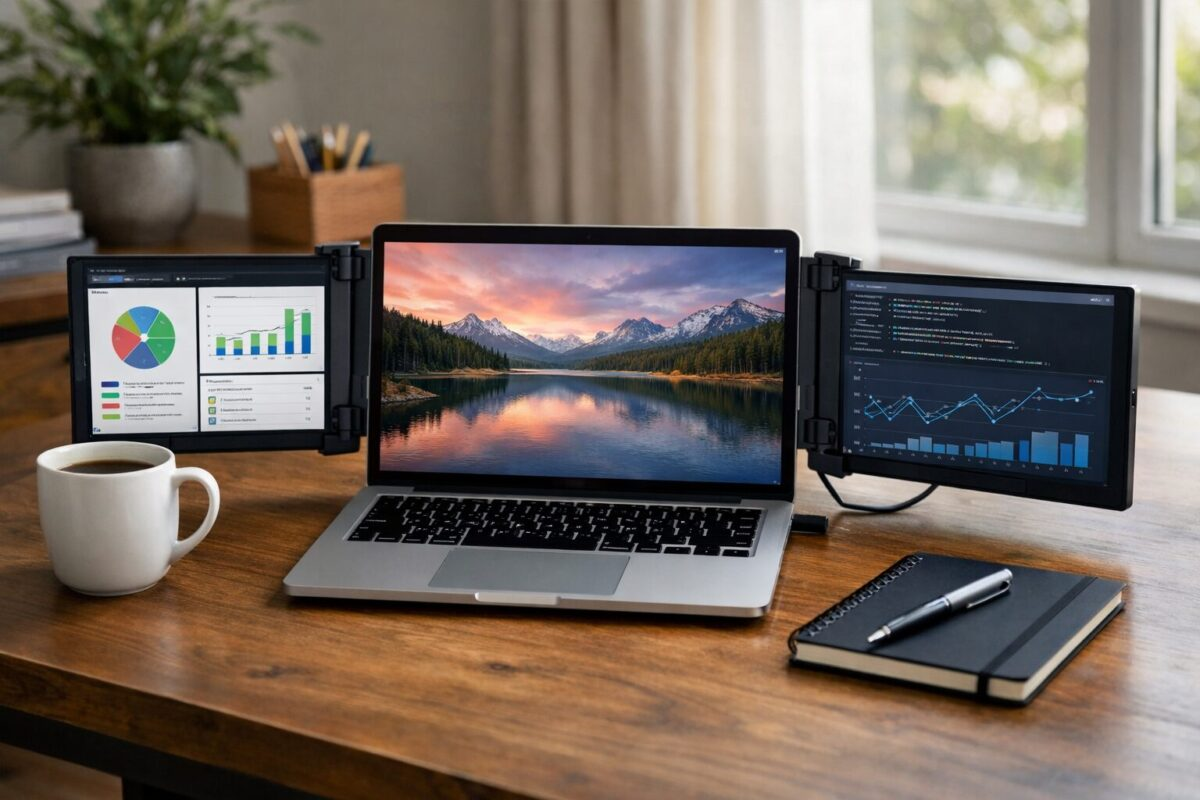
The Mobile Pixels Trio is built for working on the road. Coffee shops, airports, a week in a relative’s spare bedroom. The pitch is a laptop with three screens you can actually carry. The question is whether its worth $499 or whether youd be better off with a portable monitor and some creative window management.
Key Features
Two 14″ 1080p Screens
Slides out on either side of your laptop. Magnetic attachment holds firm without marking the lid.
Single USB-C Cable
One cable per screen. Delivers video and power. Works with most modern laptops that support DisplayPort Alt mode.
Rotates 270 Degrees
Flip a screen to portrait or face it toward someone across the table for presentations. Surprisingly useful.
Portable but Heavy
Adds 3.7 lbs to your laptop setup. You notice it in a backpack but its manageable for short travel.
What owners report
We haven’t had this setup on our own desk, so this section sticks to what the spec sheet and owner reviews say. A few things stood out.
Setup is quick once you know the mount. Mobile Pixels claims about 30 seconds to snap it on, and owners say that holds after the first attempt, which takes longer while you work out the magnetic mount.
The weight is real. Two extra screens add a few pounds to the back of a laptop, enough that owners say to avoid carrying it one handed with the screens attached. Check Mobile Pixels’ listed weight against your laptop before buying.
Owners describe color on the side screens as fine for text and spreadsheets but noticeably different from a MacBook’s main display. For photo editing, keep critical work on the main screen.
The USB C cables are too short. Some owners say they needed longer cables right away. Annoying that they dont ship with them.
Battery drain on the laptop is significant. Running two extra screens off USB bus power can cut laptop battery life roughly in half, so plug in when you can.
Who This Is For (and Who Should Skip)
Buy it if:
- You travel with a laptop and actually need triple screen productivity on the road.
- You do spreadsheet work, coding, or stock trading where multiple windows at once is non negotiable.
- You work from hotels, cafes, or client offices and want a dedicated workspace anywhere.
- You’ve already tried a single portable monitor and want more real estate.
Skip it if:
- You mostly work from a fixed desk. Get real monitors for less money.
- Your laptop is under 14 inches. The setup looks absurd and the screens dwarf your main display.
- You rarely use more than 2 windows at once. The third screen becomes a notification parking lot.
- You need high refresh rates for gaming. These are 60Hz productivity screens, not gaming displays.
Pros & Cons
Pros
- Genuine triple-screen productivity, not a gimmick
- Single USB-C cable setup is clean
- Rotates to portrait or presentation mode
- Sturdy hinges hold position well
- Works on Mac, Windows, and Linux
Cons
- Heavy, adds nearly 4 lbs to your bag
- Magnetic plate stays on laptop lid permanently
- Battery drain is significant on laptop
- Conspicuous in public spaces
- Fan noise increases under full load
Compared to Main Competitors
| Setup | Screens | Weight Added | Price |
|---|---|---|---|
| Mobile Pixels Trio | 2 added (triple) | 2.6 lb | $449 |
| Mobile Pixels Duex Plus | 1 added (dual) | 1.5 lb | $199 |
| UPERFECT Triple | 2 added (triple) | 3.1 lb | $379 |
| ASUS ZenScreen MB16ACE (x2) | 2 separate | 2.2 lb each | $400 total |
Mobile Pixels’ edge is the integrated mounting system, you carry one device that opens into three. Separate portable monitors are lighter but a pain to set up on cafe tables.
Full Specifications
| Screen Size | 2x 14″ (diagonal each) |
|---|---|
| Resolution | 1920 x 1080 per screen |
| Refresh Rate | 60 Hz |
| Connection | USB-C (DisplayPort Alt) |
| Brightness | 300 nits |
| Weight | 3.7 lbs total |
| Laptop Compatibility | 13″ to 16″ laptops |
| Warranty | 1 year |
Frequently Asked Questions
Will it work with my MacBook Pro M3?
Does the magnetic plate damage the laptop lid?
How much does it reduce battery life?
Is the image quality good?
Does it work with all laptops?
Can you use just one side screen at a time?
Does it scratch the laptop lid?
Is the touchscreen version worth the extra $100?
Final Verdict
The Mobile Pixels Trio is a specialty tool that earns its $499 for a narrow audience. If you travel weekly and work with spreadsheets, code, or anything that benefits from multiple windows, the productivity lift is real and worth the weight penalty. The single tradeoff you accept is a permanent magnetic plate on your laptop lid and a heavier bag. For casual users or travelers who prefer light packs, a single portable monitor like the ASUS ZenScreen is a better fit. But for a road warrior who actually needs three screens, nothing else packs this well.
As an Amazon Associate we earn from qualifying purchases. Prices accurate at time of writing.