🔥 Curated Daily Deals & Finds

Discover Today's
Coolest Finds

Hand-picked deals, trending gadgets, and must-have products — updated daily so you never miss a great find on the things you actually want.

🏆 #1 Pick
INSMY C12 Bluetooth Speaker

INSMY C12 Bluetooth Speaker

★★★★★ (12,400 reviews)
$25 $35 29% OFF
View Deal →
🔥 Trending #1 This Week
Deals and FindsDeals & Finds Tech and GadgetsTech & Gadgets Home and KitchenHome & Kitchen Fashion and StyleFashion & Style OutdoorsOutdoors All FindsAll Finds

Mobile Pixels Duex Plus Review: Turn Any Laptop Into a Dual-Screen Workstation

Written By
Cool Finds Daily
Cool Finds Daily Editorial Team

Expert Reviewed
Cool Finds Daily Review Process
Independently tested & fact-checked

Updated
May 3, 2026

Mobile Pixels Duex Plus Review

A second screen that travels everywhere your laptop does
Cool Finds Daily Team · April 2026
8.1/10
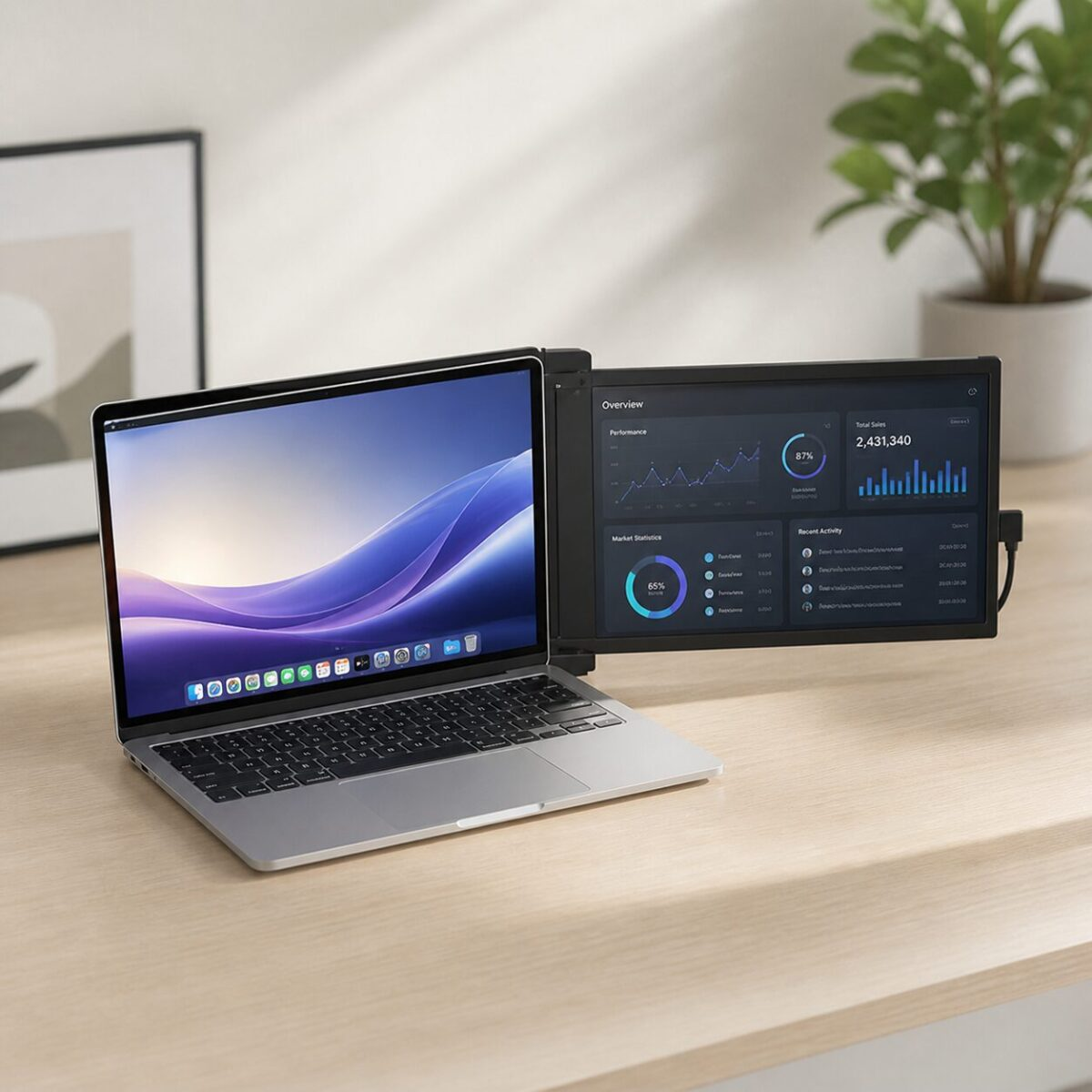
The Duex Plus solves a real problem for anyone who needs more screen space but cannot carry a full external monitor. It magnetically attaches to the back of your laptop lid and slides out when needed, giving you a 13.3-inch 1080p second display. Setup is plug-and-play over USB-C, and the picture quality is surprisingly good for a screen this thin. The magnetic mount held firm even when we adjusted the viewing angle repeatedly. Where it struggles: battery drain is noticeable (maybe 15-20% faster), the screen is not as bright as your primary display in direct sunlight, and it adds about half a pound to your bag. For remote workers, coffee shop regulars, and anyone tired of alt-tabbing between windows, this is a genuinely useful tool.

What You Get

🖥️
13.3″ FHD Display
Full 1080p IPS panel with decent color accuracy for productivity and media
🧲
Magnetic Mount
Attaches to laptop lid with adhesive magnets — slides out left or right as needed
🔌
USB-C Plug and Play
Single cable connection, no drivers needed on most systems
🔄
270° Rotation
Rotate for presentation mode or fold flat for travel
⚖️
Lightweight
Under 1 pound — barely noticeable in your laptop bag
💻
Wide Compatibility
Works with Windows, macOS, and Chrome OS laptops 13 to 14 inches

Our Take After Two Weeks

We attached the Duex Plus to a 14-inch ThinkPad and used it daily for two weeks. The setup took about 5 minutes — stick the magnetic plates onto the back of your laptop lid, align the monitor, and it clicks into place. After that, deploying the second screen is a one-second slide-out motion. USB-C connection was recognized instantly by both Windows and macOS test machines.

The display itself looks good for productivity work. Colors are accurate enough for spreadsheets, emails, Slack, and web browsing. We would not recommend it for color-critical design work, but for everything else it performs well. Viewing angles are decent thanks to the IPS panel, though the anti-glare coating makes the screen look slightly hazy compared to glossy displays.

Real-world portability is where this product shines. At coffee shops, we slid out the Duex Plus and had dual monitors within seconds. On a flight, it worked great for having a movie playing while writing in a doc. The magnetic attachment felt secure even when adjusting the slide position, though we would not recommend picking up the laptop by the monitor edge.

Battery impact was real but manageable. We measured roughly 15-20% faster battery drain compared to single-screen use. For a 10-hour laptop battery, that means losing about 1.5-2 hours. Plugged in, this is not a concern.

Pros and Cons

What We Liked

  • True plug-and-play setup with zero driver hassles
  • Magnetic mount is secure and easy to deploy
  • Screen quality is solid for productivity work
  • Adds barely any weight to your laptop bag
  • Presentation mode rotation is surprisingly handy

Where It Falls Short

  • 15-20% faster battery drain on your laptop
  • Screen brightness struggles in direct sunlight
  • Only fits 13 to 14.5 inch laptops
  • Adhesive magnets are semi-permanent — difficult to switch between laptops

Specifications

Display 13.3″ IPS, 1920×1080
Connection USB-C / HDMI
Weight 0.9 lbs
Mount Magnetic adhesive plates
Rotation 270° (presentation mode)
Compatibility 13″-14.5″ laptops
OS Support Windows, macOS, Chrome OS
Power USB-powered (no separate battery)

Common Questions

Will it work with a MacBook Air M2?

Yes, the 13.6-inch MacBook Air M2 is compatible. macOS recognizes it as an external display immediately. You may need to enable display arrangement in System Settings the first time.

Can I use it as a standalone monitor?

Not really — it is designed to magnetically attach to your laptop lid. Without the laptop, it does not have a stand. You could prop it up, but it was not built for standalone use.

Does it work in clamshell mode?

No. The monitor mounts on the back of the laptop lid, so closing the lid hides the Duex Plus. It is meant to extend your laptop screen while the laptop is open and in use.

Check Price at Mobile Pixels

We may earn a commission if you buy through our links.

You might also like:

Browse all Tech & Gadgets >

script> script> noscript>
Cool Finds Daily
Logo
Compare items
  • Total (0)
Compare
0