






Sonos Beam Alternatives in 2026: 5 Soundbars That Cost Less
Written By
Cool Finds Daily
Cool Finds Daily Editorial Team
Editorially Reviewed
Cool Finds Daily Review Process
✓ Researched & fact-checked
Updated
October 16, 2026
The Sonos Beam sits at $499 and it’s a good bar. The problem is that $499 buys a lot of soundbar in 2026, and most of what you’re paying Sonos for is the app and the multiroom system rather than the drivers. If you already own Sonos speakers, that premium makes sense. If the Beam is going to be your only Sonos device, you’re paying a tax on an ecosystem you’ll never use.
We already broke down whether the bar itself holds up in our Sonos Beam review. This is the other side of that question: what you get instead, and what each swap actually costs you.
Two of these ship with a wireless subwoofer, which the Beam does not. That’s worth sitting with for a second, because a sub does more for movie night than any amount of virtual Atmos processing.
Quick Jump
| Bar | Price | Sub included | HDMI eARC | Rating |
|---|---|---|---|---|
| Sonos Beam (the one you’re replacing) | $499.00 | No | Yes | 4.4 |
| Sonos Ray | $219.00 | No | No, optical | 4.3 |
| Polk Signa S3 | $349.00 | Yes, wireless | Yes | 4.2 |
| VIZIO 5.1 Soundbar SE | $157.41 | Yes, plus rears | Yes | 4.0 |
| Yamaha SR-C20A | $199.95 | Built in | No, optical | 4.4 |
| Roku Streambar SE | $89.99 | No | No, optical | 4.4 |
1
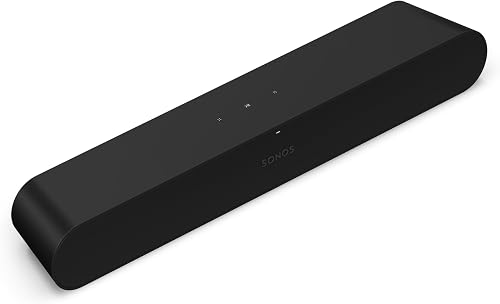
Sonos Ray
Best if you want to stay in the Sonos app
$219
Price
Optical
TV connection
Yes
Sonos multiroom
No
Built in mics
Cutting the Beam’s price by more than half while keeping the software is a hard deal to argue with. You still get Trueplay room tuning, you can still group it with a Sonos One in the kitchen, and setup is the same five minute phone thing. What you give up is real: optical instead of HDMI eARC, no voice assistant, no Atmos, and less low end. For a bedroom or a small living room with a 50 inch set, none of that is likely to matter. For a big open plan room, the Beam’s extra output is worth something.
$219.00
Check Price on Amazon
2
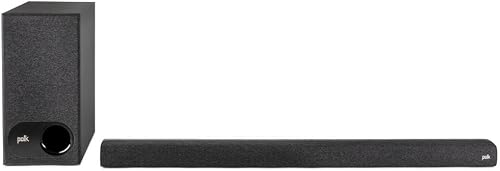
Polk Audio Signa S3
The one that actually comes with a subwoofer
$349
Price
Wireless
Subwoofer
eARC
HDMI
Built in
Chromecast
Still cheaper than the Beam and it arrives with a wireless sub, which changes the whole character of what you’re listening to. Explosions land, bass lines have a floor. Polk’s voice adjust setting is the other genuinely useful thing here, it lifts dialogue without turning everything else up, which is the complaint most people have about flat panel TV sound in the first place. Chromecast is baked in for streaming off a phone. The bar itself is unremarkable looking and the app is basic next to Sonos.
$349.00
Check Price on Amazon
3
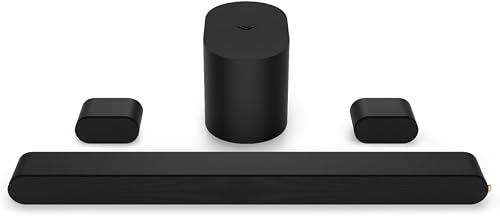
VIZIO 5.1 Soundbar SE
Most speakers per dollar on this list
5.1
Channels
Yes
Rear speakers
Atmos
Dolby support
DTS:X
Also decodes
A bar, a wireless sub, and two actual rear speakers for less than a third of the Beam. Nothing else here gives you sound behind your head. Physical rears beat any amount of virtual processing for movies, full stop. The catch is the 4.0 rating, and it’s earned: build quality is plasticky, the rears still need wall power near your couch, and the app is clunky. If you’ll run the wires, this is the most sound per dollar going. If you won’t, buy the Polk.
$157.41
Check Price on Amazon
4

Yamaha SR-C20A
Best for small rooms and desks
23 in
Width
Built in
Subwoofer
Yes
Bluetooth
Clear Voice
Dialogue mode
At 23 inches wide this fits under a monitor or a small bedroom TV where a 40 inch bar looks ridiculous. Yamaha put the sub inside the bar, so there’s one box and one cord, and it still puts out more low end than the size suggests. Clear Voice is their dialogue mode and it does the job. Optical only, no Atmos, and if you point it at a 65 inch TV in a big room you’ll wish you’d bought something bigger. Within its lane, reviewers consistently rank it among the best sounding options under $200.
$255.53
Check Price on Amazon
5
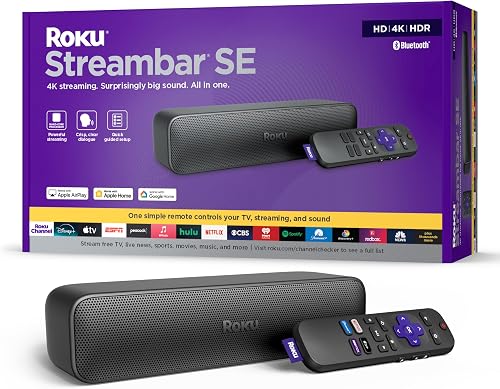
Roku Streambar SE
Cheapest exit, and it streams too
$89.99
Price
4K
Streaming built in
Yes
Voice remote
Compact
Size
This is a different animal, a small bar with a full Roku 4K player inside it, so an older dumb TV becomes a smart one and gets better sound in the same purchase. Night mode is the feature I’d actually keep, it flattens loud scenes so you can watch something at 11pm without waking the house. Don’t expect it to fill a big room and don’t expect bass. But at $89 it’s the honest answer for anyone who looked at a $499 Beam and thought no. If streaming is the bigger priority, our Roku alternatives roundup covers the player side separately.
$113.99
Check Price on Amazon
Frequently Asked Questions
Is the Sonos Ray just a cheaper Beam?
Close, with two real cuts. The Ray drops HDMI eARC for optical only, and it has no built in mics so there’s no voice assistant. It’s also smaller sounding and doesn’t do Atmos. The app, multiroom grouping and Trueplay tuning all work the same.
Do I need a soundbar with a separate subwoofer?
If you watch action movies or care about bass at all, yes, and it’s the single biggest upgrade available at this price. A bar with a wireless sub in the box will out punch a solo bar costing twice as much. You’re trading for another box on the floor and another outlet.
Will a non Sonos soundbar work with my Sonos speakers?
No. Sonos multiroom grouping only works between Sonos devices. If you already own Sonos elsewhere in the house and want the TV to join those groups, the Ray is your only option on this list.
Does optical audio sound worse than HDMI eARC?
For stereo and Dolby Digital they sound identical. The gap shows up with Dolby Atmos and DTS:X, which optical can’t carry. Optical also means juggling two remotes more often, since HDMI CEC volume passthrough isn’t always there.
You might also like:
- Echo Dot Alternatives in 2026
- Bose QuietComfort Alternatives in 2026
- Fire TV Stick 4K vs Roku Streaming Stick 4K