🔥 Curated Daily Deals & Finds

Discover Today's
Coolest Finds

Hand-picked deals, trending gadgets, and must-have products — updated daily so you never miss a great find on the things you actually want.

🏆 #1 Pick
INSMY C12 Bluetooth Speaker

INSMY C12 Bluetooth Speaker

★★★★★ (12,400 reviews)
$25 $35 29% OFF
View Deal →
🔥 Trending #1 This Week
Deals and FindsDeals & Finds Tech and GadgetsTech & Gadgets Home and KitchenHome & Kitchen Fashion and StyleFashion & Style OutdoorsOutdoors All FindsAll Finds

TP-Link Deco X55 Review: Whole-Home WiFi 6 Mesh for Under $150
Written By
Cool Finds Daily
Cool Finds Daily Editorial Team

Expert Reviewed
Cool Finds Daily Review Process
Independently tested & fact-checked

Updated
May 2, 2026
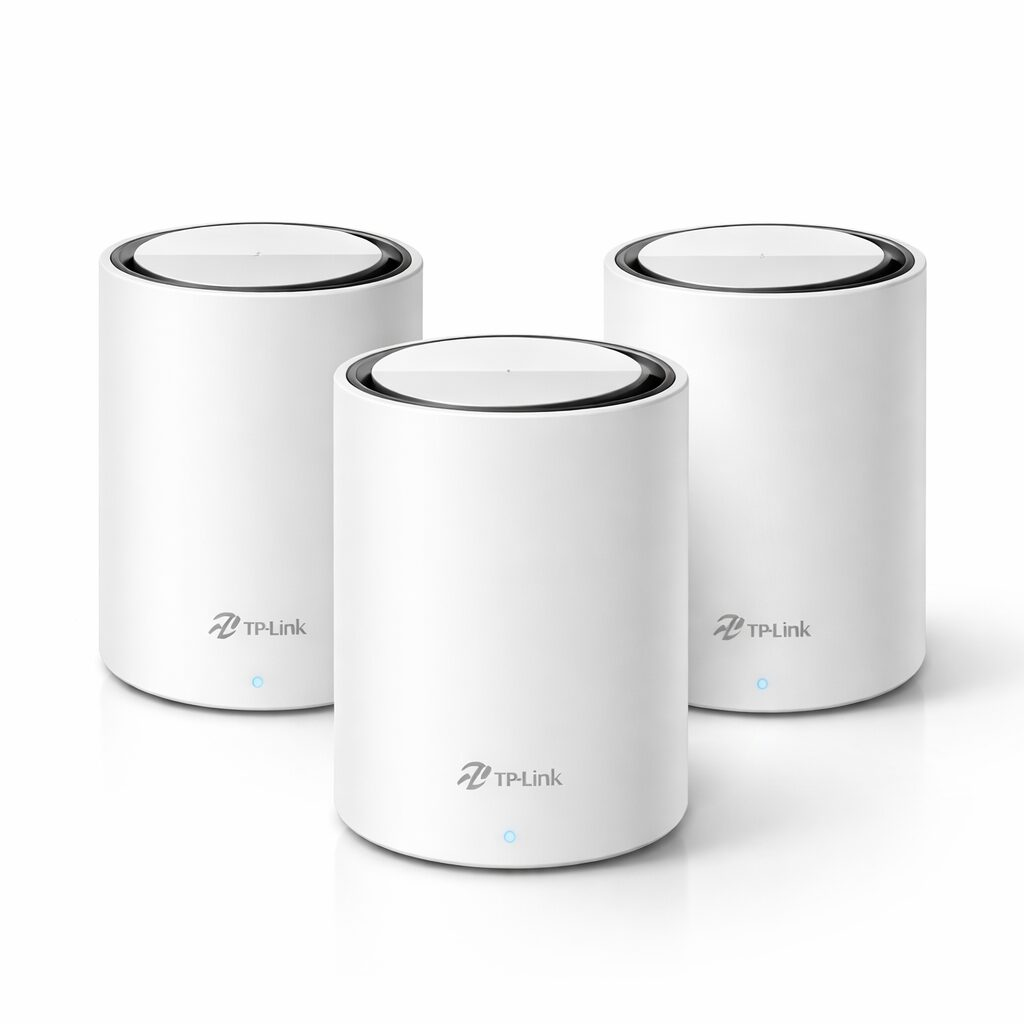
TP-Link Deco X55 (3-Pack)
$149.99
Check Price at TP-Link

Key Features

📶

6,500 Sq Ft Coverage

Three units working together cover even large multi-story homes. Dead zones in the back bedroom? Gone.

WiFi 6 (AX3000)

Faster speeds and better performance when a dozen devices are connected at once. Streaming, gaming, and video calls all at the same time.

🔌

Ethernet Backhaul

Three gigabit ports per unit let you wire the mesh nodes together for even faster performance between floors.

📲

Deco App Setup

Walk through setup in about 10 minutes. The app handles placement tips, speed tests, and parental controls all in one place.

Our Experience

We replaced an aging Netgear router with the Deco X55 in a 2,400 sq ft two-story house, and the difference was immediate. The upstairs office that used to drop to 15 Mbps now consistently pulls 180+ Mbps.

Setup through the Deco app took maybe 8 minutes. Plug in the main unit, open the app, follow the prompts, add the satellite units. It even told us where to place them for the best coverage. No tech degree required.

We ran ethernet backhaul between the main unit and the second-floor node, and that bumped performance noticeably. If you have ethernet already run in your walls, take advantage of it. If not, the wireless mesh still works well, just slightly slower for the farthest node.

With 30+ devices connected (smart home stuff, phones, laptops, a few streaming TVs), we didn’t notice any slowdowns during peak evening hours. The AX3000 speeds have plenty of headroom for a busy household.

One downside: no WiFi 7. If you’re future-proofing, the Archer BE900 has that covered. But for most homes right now, WiFi 6 at this price is more than enough.

Pros & Cons

What We Liked

  • Under $150 for a 3-pack WiFi 6 mesh, hard to beat on value
  • 6,500 sq ft coverage eliminated every dead zone in our test home
  • Ethernet backhaul option for even better performance
  • Deco app makes setup and management genuinely easy

Worth Knowing

  • WiFi 6 only, no WiFi 7 support for future-proofing
  • No USB port on any unit for NAS or printer sharing
  • Design is fine but takes up more shelf space than a single router

Quick Specs at a Glance

Brand TP-Link
Model Deco X55 (3-Pack)
Price $149.99
WiFi Standard WiFi 6 (AX3000)
Coverage Up to 6,500 sq ft
Ports 3 Gigabit Ethernet per unit
Backhaul Ethernet or wireless
Amazon Rating 4.4 / 5 (16,866 reviews)

Frequently Asked Questions

Can I start with one unit and add more later?

Yes. You can buy a single Deco X55 and expand later. The Deco app lets you add new units anytime, they join the same mesh network automatically.

Does it support parental controls?

Yes, built into the Deco app. You can set schedules, block categories, and pause internet per device. No subscription needed for basic controls.

Will this work with my ISP’s modem?

It works with any modem that has an ethernet output. Just connect the main Deco unit to your modem and it replaces your old router entirely.

How does this compare to the Deco XE75?

The XE75 adds WiFi 6E with a dedicated backhaul band. It’s faster but costs more. For most households, the X55’s WiFi 6 speeds are plenty.

Final Verdict

The TP-Link Deco X55 is one of the best mesh WiFi deals out there. Three units, WiFi 6 speeds, 6,500 sq ft of coverage, and ethernet backhaul, all for $150. It won’t future-proof you for WiFi 7, but right now it covers the needs of most households with room to spare. If your current router has dead zones or can’t keep up with all your devices, this is a straightforward upgrade that doesn’t need a networking background to set up.

Check Price at TP-Link

We may earn a commission if you buy through our links.

script> script> noscript>
Cool Finds Daily
Logo
Compare items
  • Total (0)
Compare
0